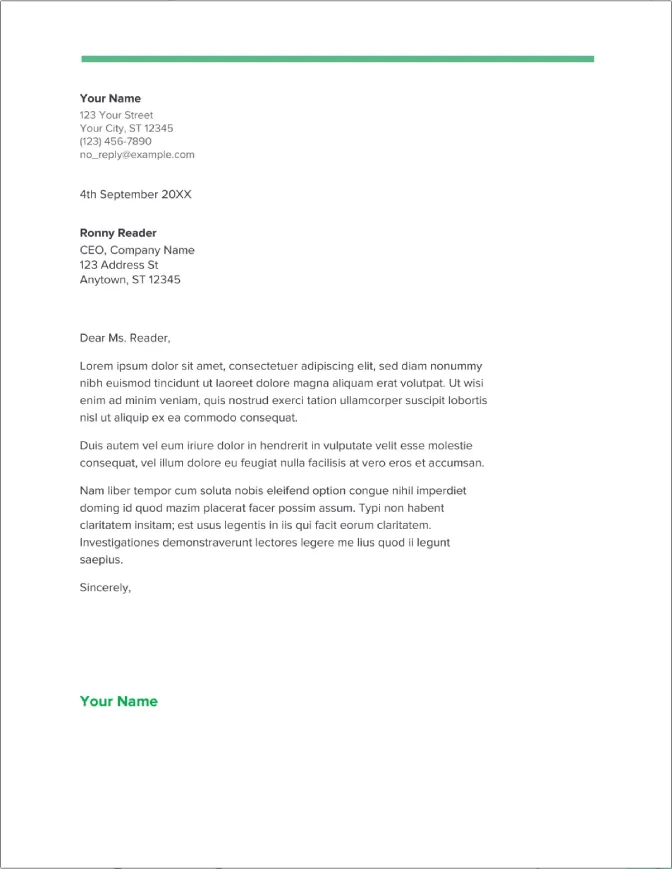
What is a Cover Letter
A cover letter is a crucial document that accompanies your resume when applying for a job. It serves as an introduction, allowing you to showcase your personality, skills, and qualifications in a way that a resume alone cannot. Think of it as your opportunity to make a strong first impression and persuade the hiring manager to review your resume. It provides context to your application, connecting your skills and experiences directly to the job requirements and demonstrating your enthusiasm for the specific role and company. A well-crafted cover letter can significantly increase your chances of landing an interview and ultimately, the job.
Why You Need a Cover Letter
In today’s competitive job market, a cover letter is essential for several reasons. Firstly, it allows you to personalize your application, tailoring it to the specific job and company. By highlighting relevant skills and experiences, you demonstrate your understanding of the role and how you can contribute to the organization’s success. Secondly, it provides an opportunity to elaborate on your accomplishments and quantify your achievements, which can make your application stand out from the crowd. Thirdly, a cover letter allows you to express your enthusiasm for the position and the company, showcasing your genuine interest. Finally, many employers specifically request cover letters, and failing to provide one can be a sign of a lack of attention to detail and may result in your application being overlooked.
Google Docs Setup for Cover Letter

Google Docs is an excellent tool for creating cover letters due to its accessibility, ease of use, and collaborative features. To get started, you’ll need a Google account. If you don’t have one, you can easily create a free account. Once you’re logged in, navigate to Google Docs. You can access it directly from your Google Drive or by typing ‘docs.google.com’ in your web browser. The user-friendly interface of Google Docs makes it easy to create, edit, and format your cover letter. You can access your documents from any device with an internet connection, and the automatic saving feature ensures that your work is always protected.
Choosing the Right Template
Selecting the right template is a great first step in creating a professional cover letter. Google Docs offers a variety of pre-designed templates that can save you time and effort. These templates provide a basic structure and formatting, allowing you to focus on the content of your letter. The key is to choose a template that aligns with your personal brand and the industry you’re targeting. Consider a clean, professional design that is easy to read and visually appealing. Avoid overly elaborate or distracting templates that may detract from the content of your letter. You can always customize the template to fit your specific needs and preferences.
Accessing Google Docs Cover Letter Templates
Finding cover letter templates in Google Docs is straightforward. Once you’re in Google Docs, click on ‘Template gallery’ at the top of the page. In the template gallery, you’ll find a section dedicated to resumes and cover letters. Browse through the available templates to find one that best suits your needs. When you find a template you like, click on it to open it. This will create a new document based on the chosen template, ready for you to customize. Remember to preview the template before selecting it, ensuring that it aligns with your overall style and the specific job application.
Customizing Your Cover Letter

Customizing your cover letter is crucial to make it stand out from the crowd. Start by replacing the placeholder text in the template with your own information, including your name, contact details, and the date. Tailor the content of your cover letter to the specific job you’re applying for. Carefully review the job description and highlight the skills and experiences that are most relevant to the position. Use the template as a starting point, but don’t be afraid to modify the structure and content to reflect your unique qualifications and personality. Remember to use keywords from the job description to make your letter more effective.
Header and Contact Information
The header of your cover letter should include your name, address, phone number, and email address. This information ensures that the hiring manager can easily contact you if they are interested in your application. Make sure your contact information is accurate and up-to-date. Consider using a professional-looking email address. Below your contact information, include the date and the hiring manager’s name and address. If you don’t know the hiring manager’s name, you can address the letter to ‘Hiring Manager’ or ‘Recruiting Team’. Double-check the spelling of all names and addresses to avoid errors.
Personalizing Your Letter
Personalizing your cover letter is essential to make a positive impression. Start by addressing the letter to the hiring manager by name, if possible. Research the company and the specific role you’re applying for. Mention something specific that attracted you to the company or the position. This shows that you’ve taken the time to learn about the organization and are genuinely interested in the opportunity. Highlight your relevant skills and experiences, providing specific examples of your accomplishments. Tailor the language and tone of your letter to match the company’s culture.
Formatting and Style

Proper formatting and style are crucial for creating a professional cover letter. Choose a clean and easy-to-read font, such as Arial, Calibri, or Times New Roman, with a font size between 10 and 12 points. Use single spacing within paragraphs and double spacing between paragraphs. Align your text to the left, and avoid justifying the text. Use bolding for headings and key phrases. Ensure that the margins are consistent throughout the document. Proofread your cover letter carefully to ensure that it is free of any grammatical errors or typos. A well-formatted cover letter demonstrates your attention to detail and professionalism.
Font Selection and Readability
The font you choose can significantly impact the readability and overall impression of your cover letter. Select a font that is easy to read and professional. Arial, Calibri, and Times New Roman are popular choices that are widely accepted. Avoid using overly decorative or unusual fonts, as they can be distracting and difficult to read. The font size should be between 10 and 12 points to ensure readability. Use bolding for headings and key phrases to draw the reader’s attention to important information. Maintain consistency in your font choices throughout the document for a polished look.
Paragraph Spacing and Alignment
Proper paragraph spacing and alignment enhance the readability of your cover letter. Use single spacing within paragraphs and double spacing between paragraphs to provide visual breaks and make the text easier to digest. Align your text to the left, which is the standard practice for professional documents. Avoid justifying the text, as this can create uneven spacing between words and make the letter appear cluttered. Ensure consistent spacing throughout the document to create a clean and organized layout. Proper spacing and alignment improve the overall appearance of your cover letter and make it more appealing to the reader.
Body of Your Cover Letter

The body of your cover letter is the heart of your application. It’s where you tell your story, highlight your skills, and express your enthusiasm for the opportunity. The body of your letter typically consists of three to four paragraphs. The first paragraph should state the position you are applying for and how you learned about it. The middle paragraphs should highlight your relevant skills and experiences, providing specific examples of your accomplishments. Quantify your achievements whenever possible. The final paragraph should reiterate your interest in the position and express your gratitude for the hiring manager’s time and consideration. Always tailor the body of your letter to each specific job.
Opening Paragraph
The opening paragraph of your cover letter is your opportunity to make a strong first impression. Start by stating the position you are applying for and where you found the job posting. Briefly mention why you are interested in the company or the role. If you have a connection or referral, mention it here. Keep the opening paragraph concise and engaging. Clearly state your purpose and make the hiring manager want to read the rest of your letter. Your opening paragraph sets the tone for the entire letter and encourages the reader to learn more about you.
Highlighting Your Skills and Experience
The middle paragraphs of your cover letter are where you showcase your skills and experience. Carefully review the job description and identify the key skills and qualifications the employer is seeking. Provide specific examples of how you have demonstrated these skills in your previous roles or experiences. Quantify your achievements whenever possible, using numbers and data to support your claims. For example, instead of saying ‘I increased sales,’ say ‘I increased sales by 15% in the first quarter.’ Tailor your examples to the specific requirements of the job. Show, don’t just tell, the hiring manager what you can do.
Demonstrating Your Value

In addition to highlighting your skills and experience, your cover letter should demonstrate your value to the company. Explain how your skills and experiences align with the company’s needs and goals. Explain how you can contribute to the company’s success. Show your understanding of the company’s mission, values, and the industry. Show that you have a clear understanding of the role. Express your enthusiasm for the position and the company. Make a connection between your qualifications and what the company is looking for. Demonstrate that you are a good fit for the organization.
Closing the Cover Letter
The closing paragraph of your cover letter should reiterate your interest in the position and express your gratitude for the hiring manager’s time and consideration. Restate your enthusiasm for the opportunity and your belief that you are a strong candidate. Include a call to action, such as stating that you look forward to hearing from them soon or that you are available for an interview at their earliest convenience. Thank the hiring manager for their time and consideration. End with a professional closing, such as ‘Sincerely’ or ‘Best regards,’ followed by your name.
Proofreading and Editing
Proofreading and editing are crucial steps in ensuring that your cover letter is professional and polished. Carefully review your cover letter for any grammatical errors, typos, or spelling mistakes. Read your cover letter aloud to catch any awkward phrasing or sentence structures. Have a friend or colleague review your cover letter for feedback. Pay close attention to the details, as even small errors can detract from your overall impression. Ensure your cover letter is clear, concise, and easy to read. Proofreading demonstrates your attention to detail and commitment to quality.
Common Mistakes to Avoid

Avoid these common mistakes to ensure your cover letter makes a positive impression. Do not use generic or overly formal language. Avoid clichés and buzzwords. Do not simply repeat your resume. The cover letter should provide additional information and context. Avoid typos, grammatical errors, and spelling mistakes. Do not write a cover letter that is too long. Keep it concise and focused. Avoid negativity or complaining. Do not include irrelevant information. Customize your cover letter to each specific job and avoid sending a generic letter to multiple employers.
Best Practices for Saving and Submitting
Follow these best practices for saving and submitting your cover letter. Save your cover letter as a PDF file to preserve the formatting and ensure that it looks the same on any device. Name your file in a professional manner, such as ‘Your Name_Cover Letter’. Review the job application instructions carefully to understand how to submit your cover letter. If the application requires a specific format or file type, follow those instructions precisely. Always double-check your cover letter before submitting it, and ensure that it is free of any errors. Send a test email to yourself to ensure that the file is attached correctly and that the formatting is preserved.
Saving as PDF
Saving your cover letter as a PDF file is essential for maintaining its formatting and ensuring that it appears the same way on any device. In Google Docs, click on ‘File’, then ‘Download’, and select ‘PDF document (.pdf)’. This will save your cover letter as a PDF file, preserving the fonts, spacing, and layout. Using a PDF file ensures that your cover letter is compatible with any operating system or device and prevents formatting errors. Name your PDF file using a professional naming convention, such as ‘Your Name_Cover Letter.pdf’.
Submitting Your Cover Letter
When submitting your cover letter, carefully follow the instructions provided in the job application. If the application requires you to upload your cover letter, ensure that you upload the PDF version of your file. If the application allows you to paste your cover letter into a text box, copy and paste the content of your cover letter into the box, while maintaining the original formatting as much as possible. In an email, include a brief subject line, such as ‘Application for [Job Title]’. Attach your cover letter and resume as separate files. Always double-check the job description for specific instructions, and ensure that you submit your application before the deadline.