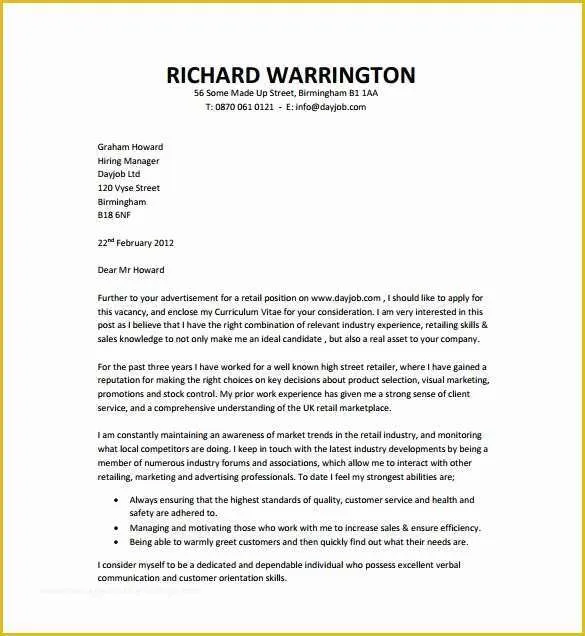
What is a Cover Letter?
A cover letter is a crucial document that accompanies your resume when you apply for a job. It serves as your introduction to the hiring manager, providing a concise overview of your skills, experience, and qualifications. Unlike a resume, which is a factual summary, a cover letter allows you to express your personality, demonstrate your interest in the specific role, and highlight why you’re a good fit for the company. Think of it as your personal sales pitch, designed to grab the reader’s attention and persuade them to learn more about you. It’s your opportunity to make a strong first impression and differentiate yourself from other candidates. A well-crafted cover letter can significantly increase your chances of landing an interview.
The Importance of a Cover Letter
In today’s competitive job market, a cover letter is not just optional—it’s often essential. It’s your chance to tell your story and connect your skills to the job’s requirements. While your resume provides a list of your accomplishments, the cover letter adds context, explaining why you’re interested in the position and the company. It demonstrates your communication skills and attention to detail, as a poorly written or generic cover letter can quickly eliminate you from consideration. Many employers use cover letters as a screening tool, so a well-written one can give you a significant advantage. Furthermore, a cover letter allows you to address any potential concerns or gaps in your resume and showcase your enthusiasm for the opportunity.
Essential Elements of a Professional Cover Letter

A professional cover letter includes several key elements that work together to make a strong impression. Start with your contact information at the top, followed by the date and the recipient’s contact information. The greeting should be professional and personalized; avoid generic greetings like “To Whom It May Concern.” The body of the letter should highlight your relevant skills and experience, tailored to the specific job description. Express your enthusiasm for the role and the company, and include a clear call to action, such as requesting an interview. Finally, end with a professional closing, such as “Sincerely” or “Best regards,” followed by your signature (if submitting a physical copy) and your typed name.
Your Contact Information
At the very top of your cover letter, provide your full name, phone number, email address, and optionally, your LinkedIn profile URL or personal website. This information should be clearly displayed and easy to find. Ensure your email address is professional and that your voicemail greeting is also professional. Double-check all contact information for accuracy to avoid any missed opportunities. This allows the hiring manager to quickly and easily reach you.
Date and Recipient’s Information
Below your contact information, include the current date. Then, address the hiring manager or the person to whom you are sending the application. If you know the hiring manager’s name, address them directly. If you are unsure, try to find their name on the company’s website or LinkedIn. If this is not possible, try to find the name of the hiring manager in the job posting.
Professional Greeting

Start your cover letter with a professional greeting. The most effective greeting is a direct one. For example, “Dear Mr. Smith,” is better than “Dear Sir or Madam,” or “To Whom It May Concern.” If you are unsure of the recipient’s name, research the company’s website or LinkedIn profiles to try to find the correct contact person. Addressing the letter to a specific person shows that you’ve done your research and are genuinely interested in the position. This personal touch can significantly increase your chances of capturing the reader’s attention.
Highlight Your Skills and Experience
In the body of your cover letter, showcase your relevant skills and experiences, using specific examples to demonstrate your capabilities. Refer back to the job description and identify the key requirements. Then, provide examples of how you have demonstrated those skills in past roles. Quantify your achievements whenever possible; instead of saying “Managed projects,” say “Managed projects, resulting in a 15% increase in efficiency.” This section should convince the hiring manager that you are a strong fit for the role by providing evidence that supports your claims.
Tailor Your Cover Letter to the Job
One of the most important steps in writing an effective cover letter is tailoring it to the specific job and company. Do not use a generic template; customize your letter to reflect your understanding of the role, the company’s mission, and the industry. Research the company’s values, culture, and recent news or initiatives. Then, explain how your skills and experience align with these factors. Demonstrate that you have taken the time to understand the company and are genuinely interested in joining their team. This shows your dedication and attention to detail, which can set you apart from other candidates.
Express Your Enthusiasm

Throughout your cover letter, express your enthusiasm for the position and the company. Explain why you are excited about the opportunity and what you hope to contribute. Show genuine interest in the role and the organization. Demonstrate a positive and professional attitude that makes you stand out from other applicants. Your enthusiasm is contagious and can leave a lasting impression on the hiring manager.
Call to Action
Conclude your cover letter with a clear call to action. State your interest in an interview and provide your contact information. Make it easy for the hiring manager to contact you. A strong call to action might look like, “I am eager to learn more about this opportunity and discuss how my skills and experience align with the needs of your team. Thank you for your time and consideration. I can be reached at [your phone number] or [your email address].” This demonstrates your proactive approach to job seeking.
Professional Closing
End your cover letter with a professional closing. Common closings include “Sincerely,” “Best regards,” or “Thank you for your time and consideration.” Be consistent with your tone throughout the document. Then, include your full name. If submitting a physical copy, leave space for your signature above your typed name.
Free Cover Letter Template Options

Numerous free cover letter templates are available online, offering a variety of styles and formats. Using a template can save you time and ensure your cover letter is well-structured and professional. However, it’s crucial to customize the template to reflect your unique skills, experience, and the specific job you’re applying for. Remember that the template is a starting point, not a final product.
Template Option 1 Modern Design
Modern cover letter templates often feature clean lines, bold headings, and a contemporary aesthetic. They typically use modern fonts and subtle design elements to create a visually appealing document. These templates are ideal for creative industries or roles where a more stylish presentation is appreciated. Examples can include templates with a two-column layout, graphical elements, or a unique color scheme. Choose a design that aligns with your personality and the company’s branding.
Template Option 2 Minimalist Layout
Minimalist templates focus on simplicity and clarity. They use a clean and uncluttered design, with a focus on typography and content. These templates are ideal for a wide range of industries and are particularly effective when you want to emphasize your qualifications over design. They often feature ample white space, simple fonts, and a straightforward layout. The goal is to make the content easy to read and the information easy to find. These templates are suitable for any professional setting where a polished appearance is required.
Template Option 3 Creative Style

Creative templates are perfect for roles in design, marketing, or other industries where a more visually engaging presentation is expected. They might include unique layouts, unconventional fonts, or the use of color and graphics. However, be cautious when choosing a creative template, and make sure it aligns with the job and the company’s brand. Remember that the goal is to showcase your creativity while maintaining a professional appearance. If you’re unsure, it’s often better to opt for a more traditional format. Ensure that the design enhances your content and doesn’t distract from it.
Template Option 4 Traditional Format
Traditional cover letter templates follow a more formal format, with a classic layout and professional font choices. They typically include a standard header, a clear and concise body, and a professional closing. These templates are suitable for any industry and provide a reliable and universally accepted format. They emphasize the content and your professional qualifications. A traditional template ensures that your cover letter looks professional and is easy for hiring managers to read and understand. Stick with simple, easy-to-read fonts such as Times New Roman or Arial.
Template Option 5 Functional Template
Functional templates focus on your skills and abilities rather than your work history. These are often used by job seekers with career gaps or those changing careers. They emphasize transferable skills and achievements rather than chronological work experience. The goal is to highlight your capabilities and the value you bring to the table. When using a functional template, ensure your skills match the job description and include quantifiable achievements.
Tips for Customizing Your Cover Letter Template

Customizing your cover letter template is crucial to making a strong impression. Start by replacing the template’s placeholder text with your own information, including your contact details, the hiring manager’s name (if known), and the specific job you are applying for. Review the job description carefully and tailor the content to match the required skills and experience. Quantify your achievements with numbers and data to demonstrate your impact. Consider using a professional-looking font like Times New Roman or Arial. Finally, make sure to proofread your cover letter carefully to catch any errors in grammar and spelling.
Proofread and Edit
Always proofread your cover letter multiple times to ensure it is free of grammatical errors, spelling mistakes, and typos. Errors can make a negative impression on hiring managers, so taking the time to carefully review your document is essential. Use a grammar checker, but also read the letter aloud to catch any awkward phrasing. Having a second pair of eyes to review your cover letter can also be very beneficial. Proofreading is an essential step in any job application process.
Save in PDF Format
When submitting your cover letter, save it as a PDF file. This ensures that your formatting and design will be preserved, regardless of the recipient’s computer or software. PDF files also prevent accidental edits. Using a PDF file ensures that your cover letter will appear exactly as intended and can enhance its professional appearance. Be sure to name your file clearly (e.g., “Your Name_Cover Letter.pdf”).
Consider the Tone

Your cover letter should reflect your personality and the tone of the company you’re applying to. Use a professional and respectful tone, but don’t be afraid to inject your personality into your writing. Research the company’s brand and culture to determine the appropriate tone. For example, a creative agency might appreciate a more conversational and enthusiastic approach, while a law firm might prefer a formal and concise style. Always remain professional and enthusiastic, but tailor your language to match the company’s voice.
Best Practices for Using Free Templates
While free templates are convenient, it’s important to use them strategically. Avoid using the exact template without customization; this can make your application look generic. Instead, treat the template as a starting point and personalize it to highlight your unique qualifications and experiences. Make sure the template is appropriate for the job and the industry. Be mindful of the template’s design and ensure it is clear, easy to read, and visually appealing.
Where to Find Free Cover Letter Templates
Many online resources offer free cover letter templates. These templates can be a great resource for job seekers of all experience levels. Consider some of the resources listed below for help in crafting a professional cover letter.
Online Template Providers
Websites like Canva, Microsoft Office Online, and Resume.io provide a wide variety of free cover letter templates. These platforms offer templates in various styles and formats, allowing you to find one that suits your needs. They also often include editing tools that make it easy to customize your template. Some platforms may require a paid subscription for premium templates or advanced features, so be sure to explore the free options available. Many of these platforms also have helpful guides on writing cover letters and resumes.
Word Processor Templates
If you use Microsoft Word or Google Docs, you can find built-in cover letter templates within those applications. These templates are generally easy to use and customize. To access these templates, simply open a new document and search for “cover letter templates.” They provide a great starting point for your cover letter and can save you time. You can easily edit and customize these templates to create a professional cover letter using your chosen word processor.