What is a Cover Letter
A cover letter is a crucial document that accompanies your resume when applying for a job. It serves as your personal introduction to the hiring manager, providing a space to highlight your key skills, experiences, and express your enthusiasm for the specific role and company. Unlike a resume, which is a factual summary of your qualifications, a cover letter allows you to personalize your application and demonstrate your understanding of the job requirements and the company’s values. A well-crafted cover letter can significantly increase your chances of getting noticed and securing an interview, as it provides context to your resume and showcases your personality and communication skills.
Purpose of a Cover Letter
The primary purpose of a cover letter is to introduce you to the employer and persuade them to read your resume. It allows you to explain why you are a strong fit for the position and the company. It offers a chance to elaborate on specific experiences or skills that are relevant to the job description, which you might not be able to fully detail in your resume. Cover letters also demonstrate your writing skills, attention to detail, and your genuine interest in the opportunity. By tailoring your cover letter to each job application, you show that you’ve done your research and are genuinely interested in the role and the company, setting you apart from candidates who send generic applications. A well-written cover letter can make a significant difference in making a positive first impression.
Key Components of a Cover Letter

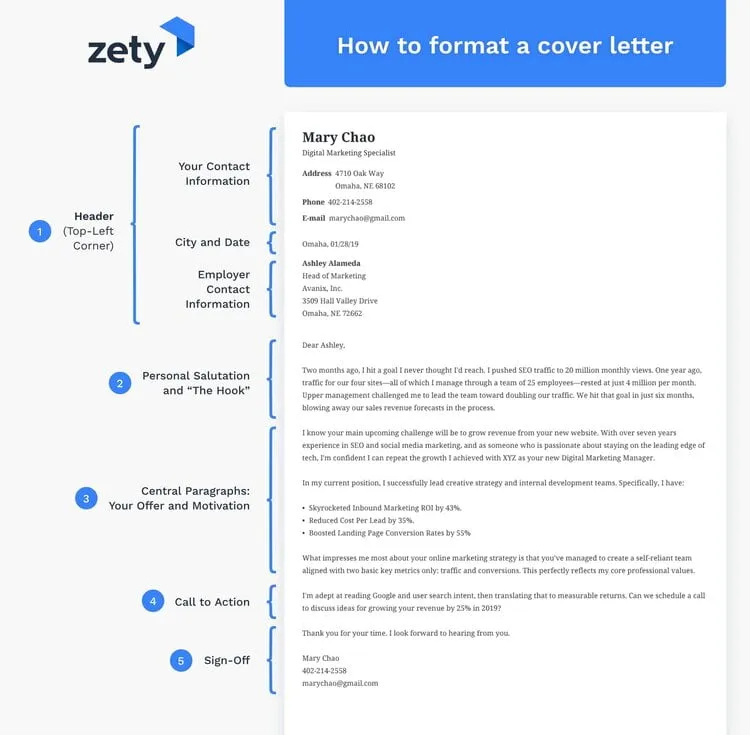
A standard cover letter format includes several key components that work together to create a compelling introduction and showcase your qualifications. Each element plays a vital role in presenting you professionally and effectively communicating your value to the potential employer. Following a well-structured format is essential for clarity, readability, and making sure you include all the necessary information to impress the hiring manager and secure an interview.
Contact Information
At the top of your cover letter, include your contact information. This should include your full name, address, phone number, and email address. Ensure that the email address is professional; avoid using nicknames or informal language. This information allows the hiring manager to easily contact you if they are interested in your application. It’s a simple yet crucial part of the cover letter format, making sure your contact details are easily accessible ensures that you don’t miss any opportunities.
Ensure your contact information is aligned to the left or right side of the page, depending on the style of your cover letter template. Keep your contact information concise and clear, so it does not distract from the main content. Consistency in the formatting of your contact details across your resume and cover letter is also recommended to maintain a professional appearance.
Date
The date should be placed directly beneath your contact information. This is typically the date you are submitting your application. Use a formal format, like ‘October 26, 2024’. This dating is a standard component of any professional letter and helps to establish the timeframe of your application. Placing the date in the appropriate position is crucial to follow correct cover letter format and gives context to the application.
Recipient Information

Include the hiring manager’s name and title, the company name, and the company’s address. Addressing your letter to a specific person, if possible, is highly recommended as it adds a personal touch. If you are unsure of the hiring manager’s name, you can often find it on the company’s website, LinkedIn, or the job posting itself. Using ‘Dear Hiring Manager’ is acceptable but less personal. This section demonstrates that you have taken the time to research the company and are interested in the specific opportunity, and that you are following a good cover letter format.
Salutation
The salutation is your greeting to the hiring manager. Use ‘Dear [Mr./Ms./Mx. Last Name]’ if you know the person’s name. If not, ‘Dear Hiring Manager’ is appropriate. Avoid overly casual greetings like ‘Hi’. The salutation sets the tone for your letter. It should be formal and respectful, showing that you understand and follow standard business etiquette. Your choice of salutation contributes to the overall professional cover letter format.
Body Paragraphs
The body paragraphs are the core of your cover letter, where you make your case for why you are a suitable candidate. This section needs a well-structured approach to be most effective. The content should provide the hiring manager with the relevant information that is easy to understand and allows you to make a strong impression. The body is your opportunity to connect your experiences and skills to the job requirements, while also highlighting your enthusiasm for the position.
Introduction

The introduction should clearly state the position you are applying for and how you learned about it. Briefly mention why you are interested in the role and the company. This sets the stage for the rest of your letter and grabs the reader’s attention. In the introduction, make a strong first impression and get the hiring manager interested in reading more about your qualifications and background.
Highlighting Skills and Experience
In the subsequent paragraphs, elaborate on your skills and experiences that align with the job requirements. Provide specific examples to demonstrate your accomplishments and quantify your achievements whenever possible. Explain how your skills have contributed to past successes. Ensure the information you share is targeted and relevant to the job description. This will show the hiring manager how you can bring value to their company.
Expressing Enthusiasm
Express your genuine interest in the role and the company. Explain why you are excited about the opportunity and what attracts you to the organization’s mission, values, or culture. Demonstrating your enthusiasm sets you apart from other applicants and makes your application more memorable. Show your enthusiasm throughout the body of your cover letter to make your application stand out.
Call to Action

Conclude your body paragraphs with a call to action. Express your interest in an interview and your willingness to discuss your qualifications further. This clearly indicates your next steps. This demonstrates your initiative and desire to move forward in the hiring process.
Closing
The closing of your cover letter should be polite and professional. The closing includes a complimentary close and your signature, which should follow the standard format of a cover letter.
Complimentary Close
Use a professional closing, such as ‘Sincerely,’ ‘Best regards,’ or ‘Thank you.’ Choose the one that feels most natural and fits the tone of your letter. The closing marks the end of your message and should leave a positive impression.
Signature

If submitting a digital cover letter, type your full name after the complimentary close. For a printed cover letter, leave space for your handwritten signature above your typed name. Your signature adds a personal touch and reinforces the professional look and feel of your application.
Cover Letter Format Best Practices
To ensure your cover letter makes a positive impact, follow these best practices. They focus on clarity, professionalism, and making a strong connection with the hiring manager. By adhering to these standards, you demonstrate your attention to detail and your commitment to excellence, and you are well-positioned to make a strong impression.
Formatting
Formatting is a key part of presenting your cover letter in a way that is easy to read and visually appealing. This includes choices about font, spacing, and overall layout. A well-formatted cover letter helps create a favorable first impression and highlights your professionalism.
Font and Size

Use a professional font like Times New Roman, Arial, or Calibri, with a font size between 10 and 12 points. These fonts are easy to read and convey a sense of professionalism. Avoid using overly stylized fonts, which can distract from the content of your letter. Consistency in font choice and size helps to ensure your letter looks polished and easy to navigate. Good typography enhances readability and makes a positive impact.
Ensure that the font size is easily readable. Select a font that is consistent with the style of your resume. It’s recommended to use the same font for both documents to maintain a cohesive and professional appearance across your application materials. Correct font choice and size contribute to a professional and well-presented cover letter.
Margins and Spacing
Use standard 1-inch margins on all sides of your cover letter. Maintain single or 1.15 line spacing to ensure the text is easy to read without appearing cramped. Proper spacing helps to create a balanced and professional look. Adjust spacing to keep it consistent throughout your cover letter, which significantly impacts readability and visual appeal. Sufficient spacing between paragraphs and sections allows the reader to easily process the information, keeping your cover letter clear and well-organized.
File Format
Always save your cover letter as a PDF file unless the job application specifically requests a different format. PDF files preserve your formatting, ensuring that your cover letter looks the same on any device. PDF files also prevent any potential formatting issues that may occur when opened in different software or operating systems, safeguarding your application. If you are unsure, always default to PDF to maintain the integrity of your document.
Proofreading
Proofread your cover letter multiple times to check for any grammatical errors, typos, or inconsistencies. Ask a friend or family member to proofread it as well, as a fresh pair of eyes can often catch errors you might miss. Proofreading is an important step in the cover letter format process and ensures your cover letter looks professional and reflects your attention to detail. Correcting these errors helps to avoid any negative implications, as it is part of presenting yourself at your best.
Cover Letter Examples and Templates
Using cover letter examples and templates can simplify the writing process and provide a helpful structure. You can adapt the format to suit your specific experience and the job you are applying for. There are plenty of resources available that provide well-designed templates, and that can make the application process much easier.
Where to Find Cover Letter Templates
Many websites offer free cover letter templates. Search online for ‘cover letter templates’ to find a variety of options. Websites specializing in resume and cover letter services often have templates as well. Choose a template that matches the style and industry of the job you are applying for. Explore these resources to find a template that fits your needs. Consider the professional and modern look to align with your professional image.
Customizing Templates
When using a cover letter template, make sure to customize it to reflect your unique qualifications and the specific requirements of the job. Replace the placeholder text with your own information, tailor the content to the job description, and highlight the skills and experiences most relevant to the position. Personalization is key to making your cover letter stand out. Adapt the template to make the application more personal. This is to ensure it is tailored to the specific role. Customizing a template will significantly increase the effectiveness of your cover letter.